Role
Lead product designer
Timeline
Q1 2026: 0 to 1 MVP
Q3 2026: Plaid integration
Team
PM, tech lead, backend & platform eng
Compliance, AML, marketing
Platforms
Web, iOS, Android
Role
Lead product designer
Timeline
Q1 2026: 0 to 1 MVP
Q3 2026: Plaid integration
Team
PM, tech lead, backend & platform eng
Compliance, AML, marketing
Platforms
Web, iOS, Android
Designing M1's financial data foundation for personalized advice
01. Why it mattered
M1 set out to offer personalized financial advice by Q3 2026. But advice is only as good as what the AI advisor knows, and M1 knew nothing about clients' money outside M1.
The balance sheet was how M1 would learn it. In return, clients would get something they wanted anyway: their true net worth in one place.
The problem we need to solve
How might we get clients to share their money outside M1, so advice reflects their real finances?
01 What M1 needed
A full picture of each client's money, so the AI advisor could give real advice.
02 What clients get
Their true net worth in one place, without another app or spreadsheet.
Success looked like
8–10% of Advisory clients adding outside accounts by the end of Q3.
02. The results: Impact at a glance
3.2x
Growth in adoption since the MVP, from 4% to 12.9%
12.9%
Of Advisory clients added outside accounts, beating the 8–10% goal
Based on about 6,000 clients with an open Advisory relationship, as of late September 2026.
03. Chapter 1: Building it from zero (Q1)
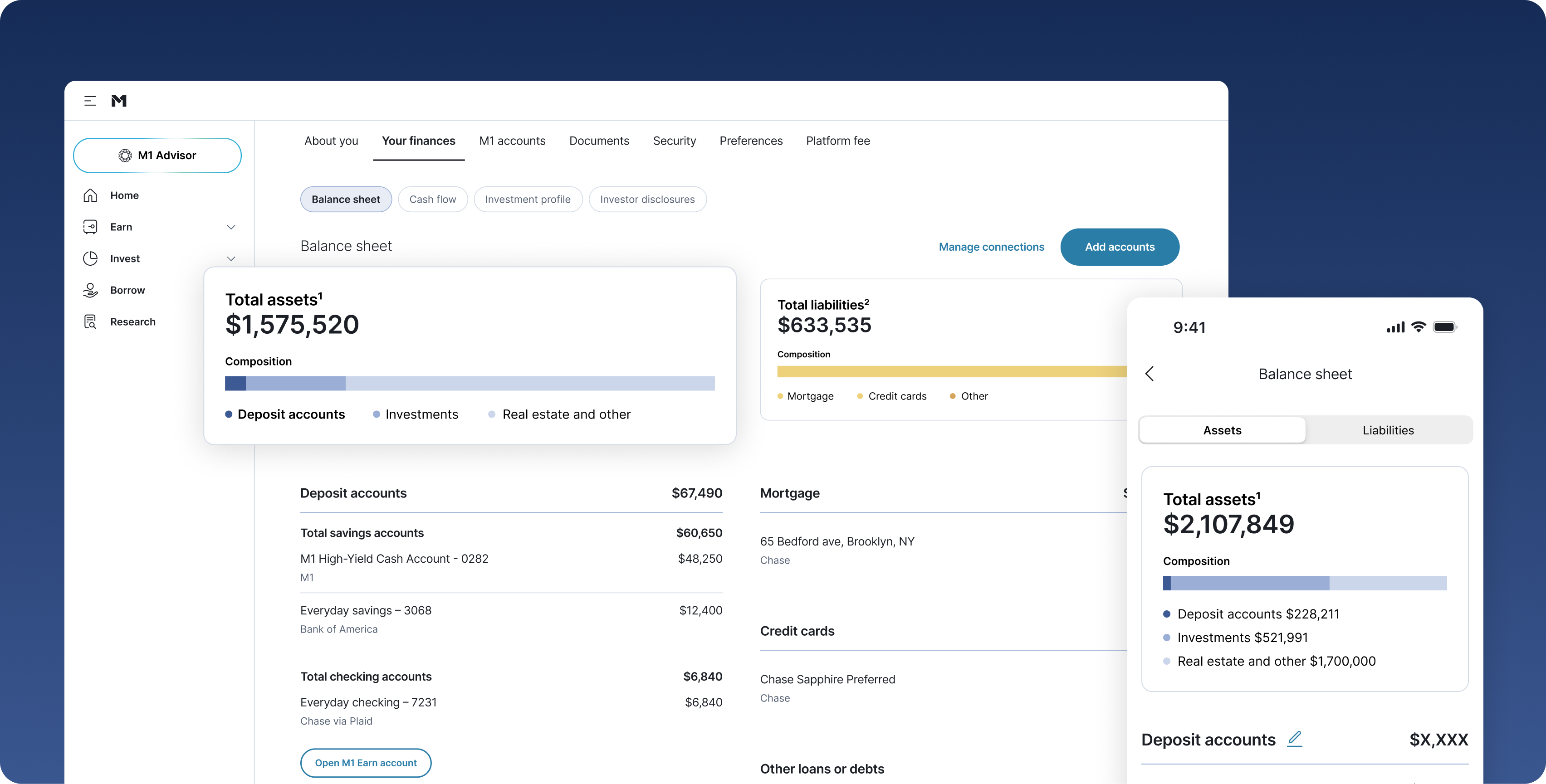
The first goal was to prove the idea with the smallest useful version. I designed a balance sheet where M1 accounts appear pre-filled next to everything a client owns and owes elsewhere, with total net worth on the home screen.
Every number says where it came from
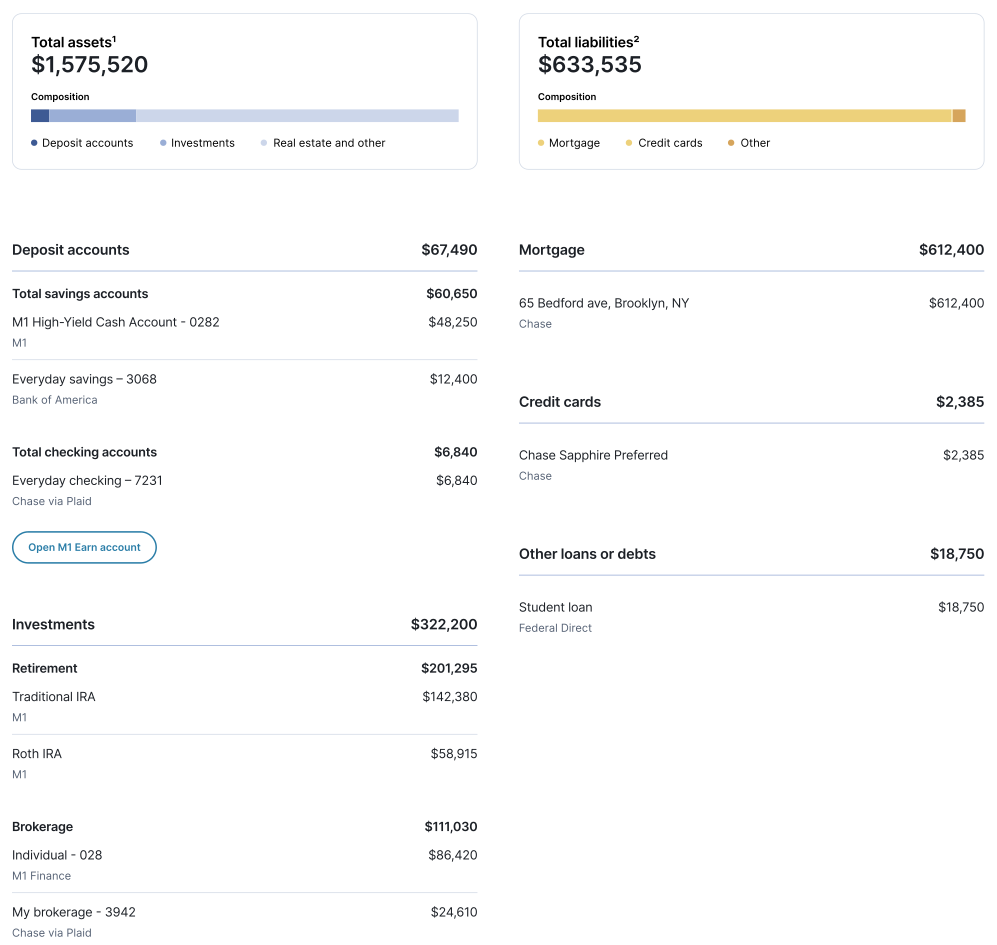
Source labels tell the client, and M1 Advisor, which balances update themselves and which were typed in.
Manual entry first. Clients typed in outside balances. It was quick to ship and answered the first question: would clients share this at all?
A home in settings. The balance sheet lived in a new “Your finances” area next to the investment profile, part of a wider effort to make every client profile advice-ready.
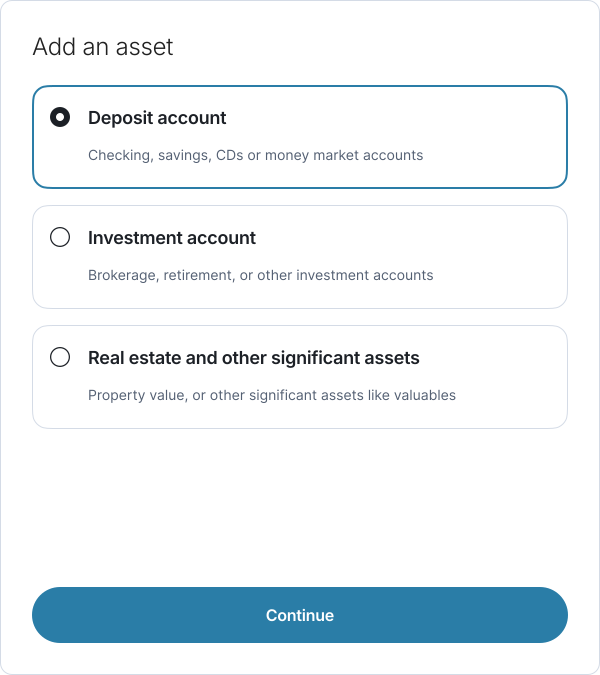
Q1 · Step 1 · Pick a category
Q1 · Step 2 · Type the balance
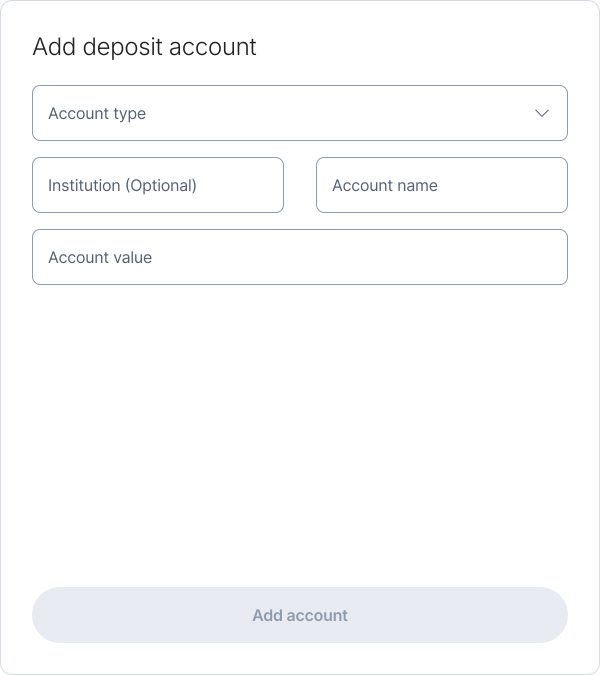
Manual entry in the MVP. Every outside account was a form, and the balance was whatever the client typed that day.
What the MVP taught us
Clients did share, but only a few: about 4% of advisory clients added outside accounts. Two things held it back. Hand-typed balances went stale almost immediately, and the page was buried in settings, where most clients never looked. Behind the scenes, M1 Advisor saw only a single number per account, not what was inside it.
04. Chapter 2: Making it live with Plaid (Q3)
The next step was clear: replace typing with connecting. I led design across web, iOS and Android, working daily with product, engineering and compliance, because nearly every screen touched consent rules or the data model.
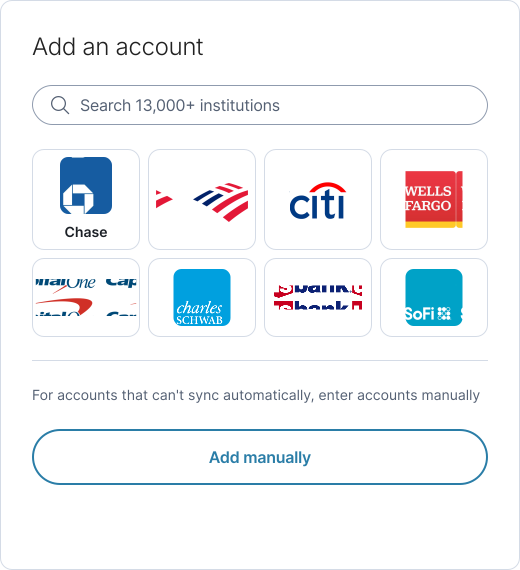
Q3 · Step 1 · Pick your bank
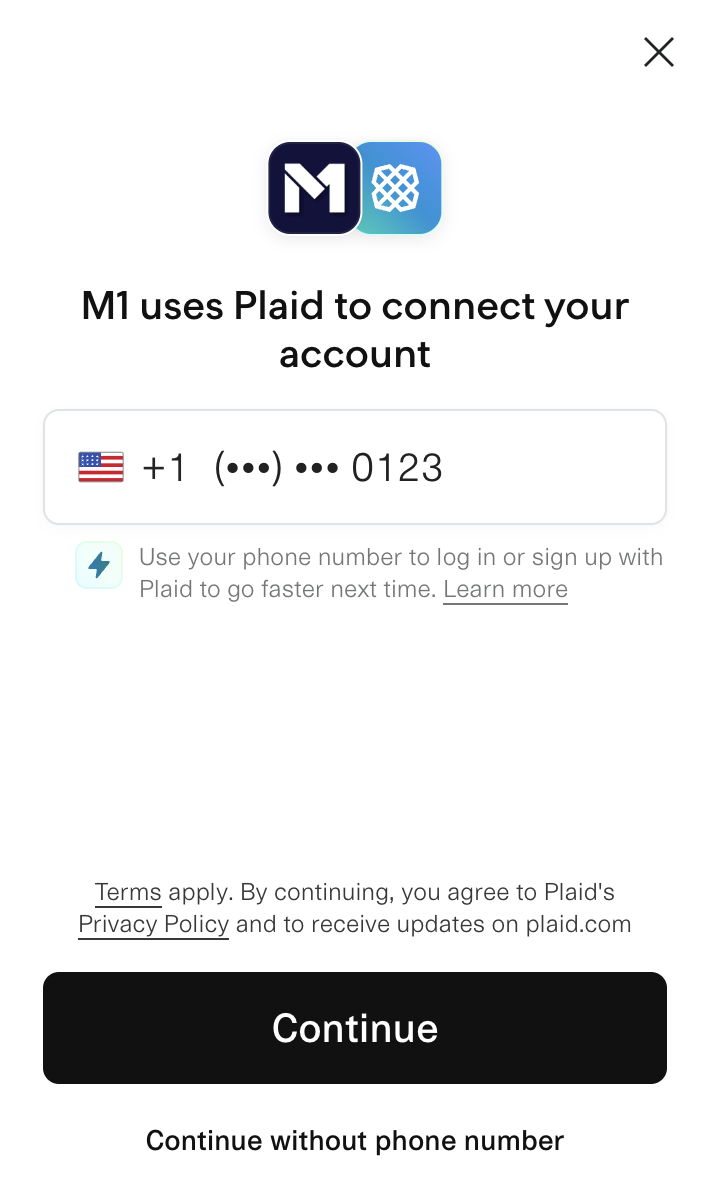
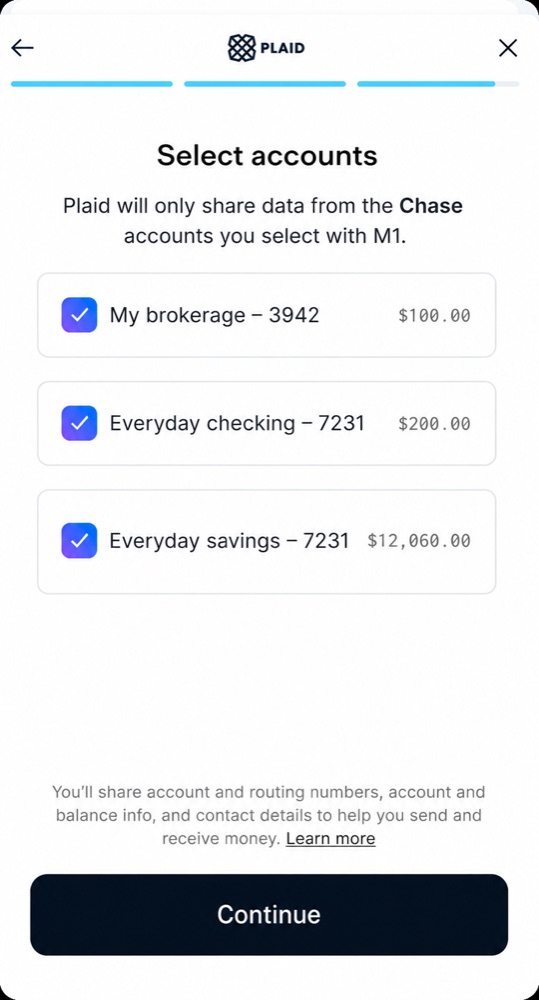
Q3 · Step 2 · See what came in
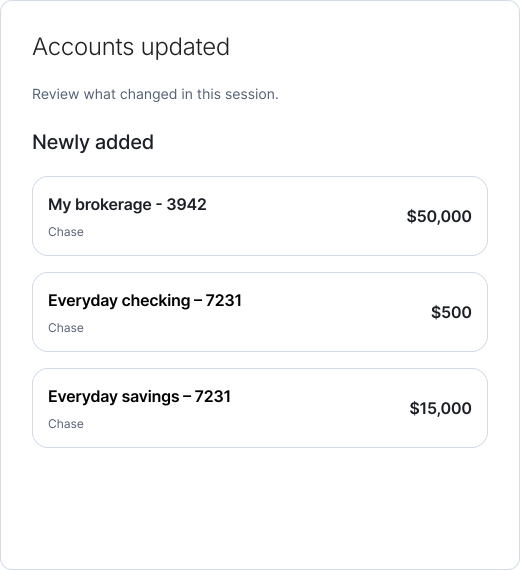
Same entry point, different job. The client picks a bank instead of a category, and M1 confirms what came in before sending them back to the balance sheet. Manual entry stays as the fallback for accounts Plaid can't reach.
Shaping and testing in code
Before committing to a direction, I built quick proofs of concept with Claude and brought them to shaping calls with engineering. Working in code surfaced what Plaid and our data model would and wouldn't allow, early, while it was still cheap to change course.
For usability testing, I built the prototype myself: a working React version of the flow in a copy of M1's web app, running on mock account data and built from Liquid components.
In moderated sessions, every participant finished every task unaided, which confirmed the core flow. The sessions still changed four decisions:
What we heard
What I changed
What we heard
All participants expected broken accounts to stay visible, flagged in red, not vanish from net worth
What I changed
Disconnected accounts keep their last known value, with a clear reconnect flag
What we heard
One participant had lost years of history in another aggregator when removing an account
What I changed
A choice to close an account and keep its history, or delete it permanently
What we heard
The eye icon for hiding accounts read as “reveal”
What I changed
Explicit labels and a first-use tooltip
What we heard
Most participants missed that connecting a bank to fund M1 also adds it to the balance sheet
What I changed
A value prop screen before Plaid opens, and an explicit funding account picker
Three milestones, each shipped on its own
Instead of one big launch, we shipped in three pieces. Clients got value all quarter, and each release informed the next.
Milestone 1
Live connections
Problem
Balances went stale
What shipped
Plaid linking for banks, brokerages, retirement accounts, cards and loans. One place to manage and repair connections. Clearer consent copy. Outside holdings and transactions flowing to M1 Advisor.
Milestone 2
Safe changes
Problem
Fixing or removing a connection felt risky
What shipped
A summary of what changed after each Plaid session. Keep history or delete permanently. A warning before unlinking an account that funds M1. Broken connections flagged with a direct fix.
Milestone 3
Discoverability
Problem
Clients never found the balance sheet
What shipped
Prompts on the home screen and its net worth graph. M1 Advisor prompts on Home, Invest and Earn. A value prop screen before Plaid opens.
Milestone 1 · One place to manage connections
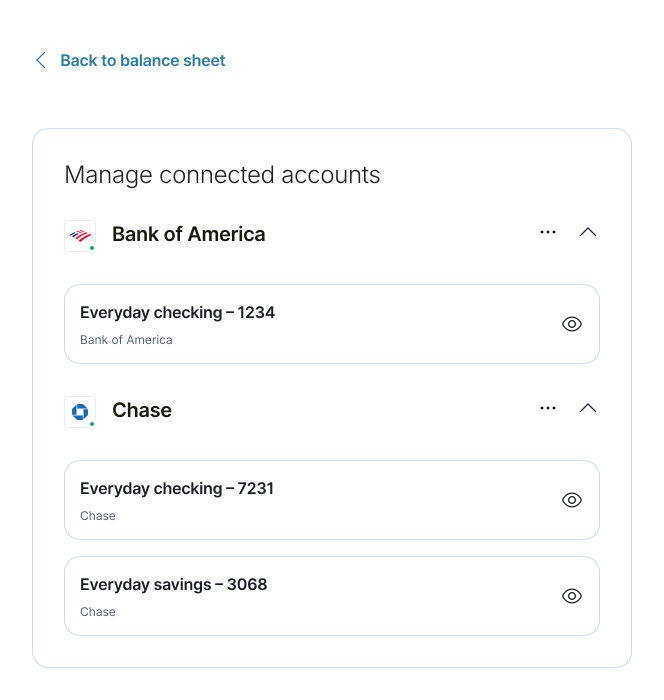
Every linked bank in one list. A health dot shows each connection is working, and the eye icon says what it does before you use it: hiding an account takes it off the balance sheet and confirms it.
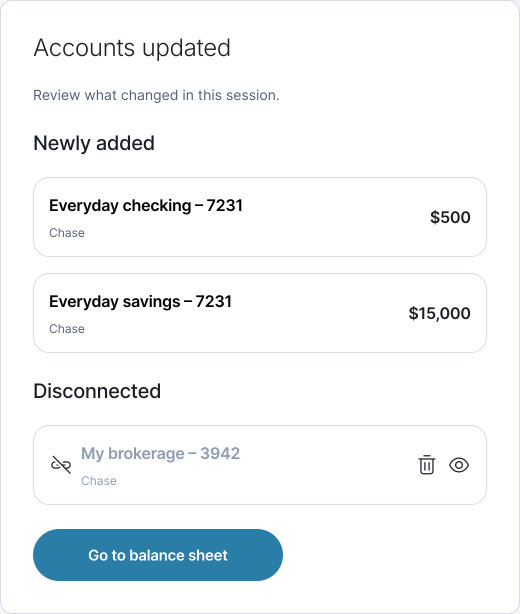
Milestone 2 · What changed
Milestone 2 · What deleting erases
Permanently delete account
Everything associated with this account will be removed. This can’t be undone.
Balance history
All historical net worth data will be deleted
After every Plaid session, the client sees what was added, disconnected and reconnected. Disconnecting keeps an account's history. Only permanent deletion removes it, and the warning says so.
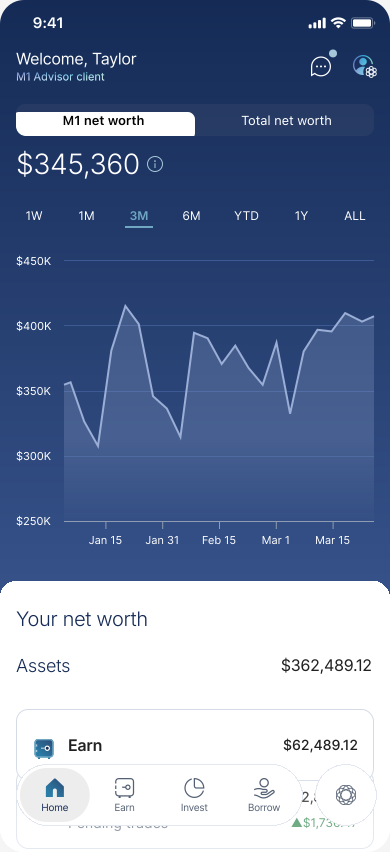
Milestone 3 · Net worth on Home
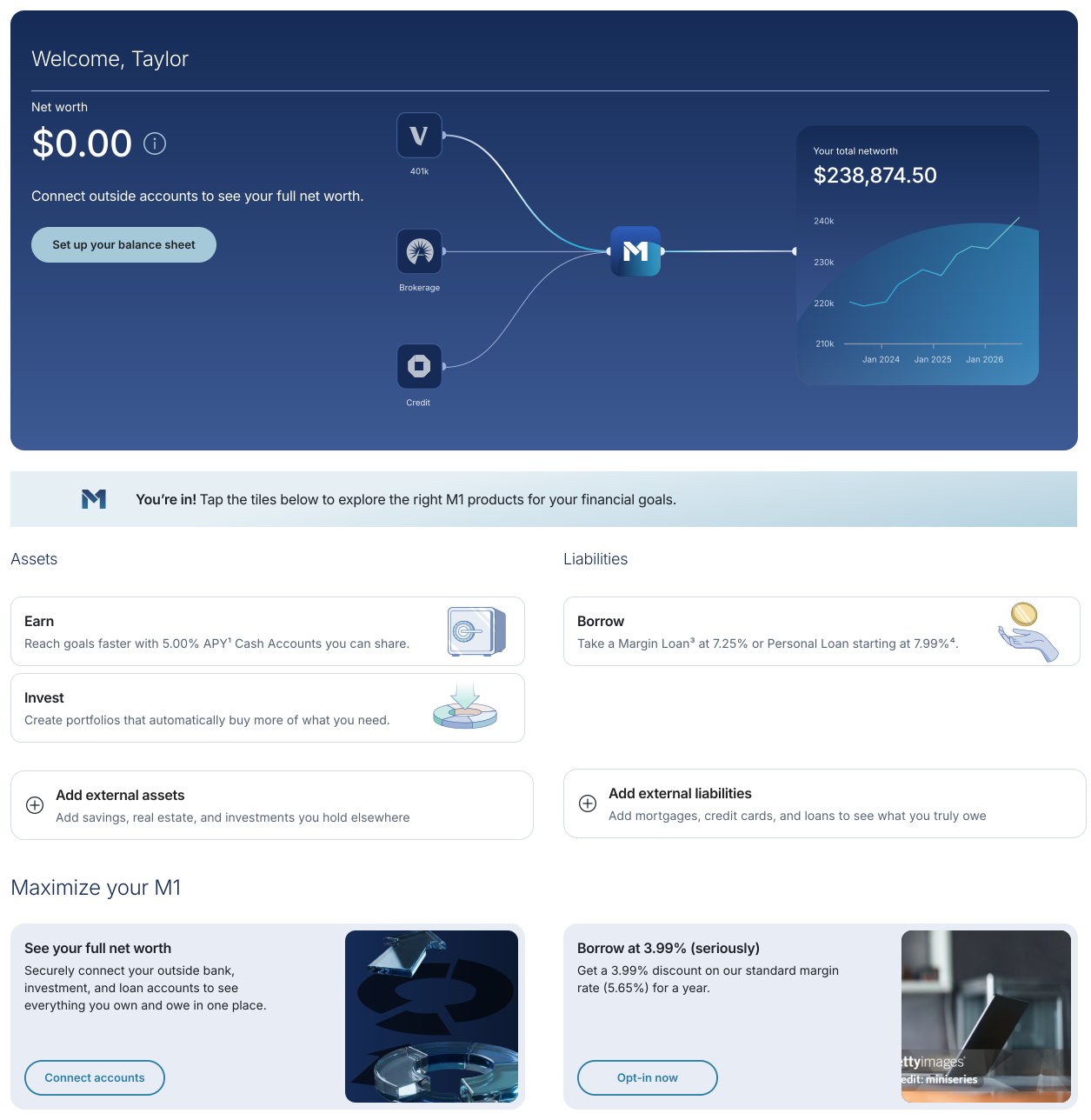
Home now points to the balance sheet instead of leaving it in settings. A new client sees $0 net worth with one next step, plus entry points beside the M1 product tiles.
05. Designing for M1 Advisor
The balance sheet had two audiences. Clients needed a clear picture of what they own and owe. M1 Advisor, M1's AI advisor, needed accurate, current context to give advice worth acting on. An AI can only be as useful as what it knows, so a big part of this project was designing that context: what the advisor sees, how fresh it is, and who decides.
What M1 Advisor could see · Q1 MVP
One hand-typed number per outside account, often out of date.
What M1 Advisor could see · Q3 with Plaid
Live balances, holdings and transactions across banks, brokerages, retirement accounts, cards and loans.
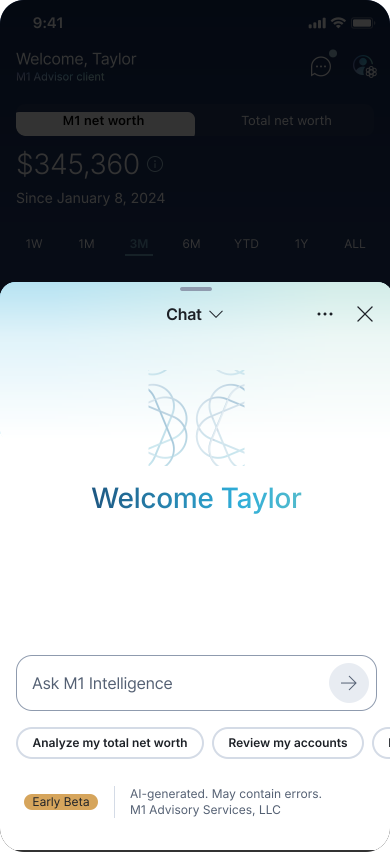
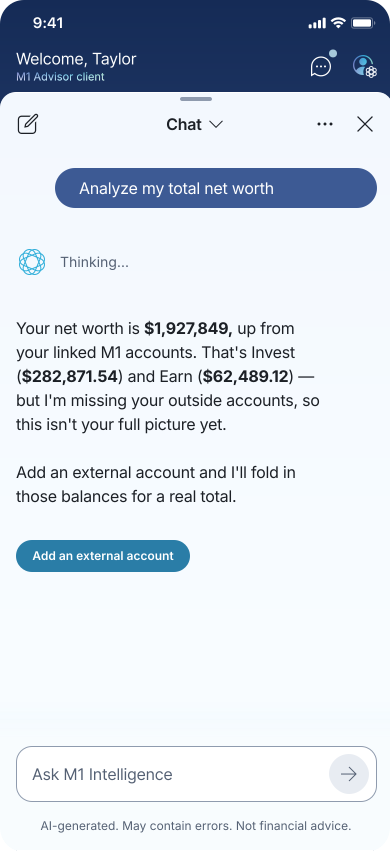
M1 Advisor · Ask about your total net worth
Ask M1 Advisor about net worth and it answers from what it can see, says what it's missing, and points the client to adding their outside accounts.
The payoff
When a client asks M1 Advisor to “Analyze my total net worth,” the answer now includes the old 401(k), the checking account at another bank and the mortgage, not just what's held at M1.
Designing for AI isn't only the chat window. Here, most of the work was upstream: the quality, freshness and consent of the data the advisor reasons over.
06. From prototype to production
I didn't hand off files and wait. Engineering owned Plaid, the data model and account logic. I owned how the experience looked and read, and shipped much of that myself.
01 Shape
Proofs of concept
Built with Claude to find constraints with engineering before design was locked.
02 Test
Coded prototypes
Real screens on mock data, used in moderated usability sessions.
03 Ship
Pull requests
Scoped UI changes, reviewed and approved by engineering, then merged.
What I shipped
Storybook first. I added new states to Liquid before they were used in the product: account rows that are connected, disconnected, need reconnecting or are excluded, the institution health dot, and the delta screen's added, disconnected and reconnected groups. Engineers built screens against those stories instead of guessing from specs.
Small, reviewable PRs. Empty-state copy for each balance sheet category, the eye-icon tooltip and confirmation toast, the delete-account warning, and spacing and token fixes. Each one was reviewed and approved by an engineer before I merged it.
Design QA I could fix myself. During each milestone's testing party, I fixed visual bugs directly instead of filing tickets.
07. The decision that made it work: one connection, two jobs
Many clients had already linked a bank through Plaid to fund M1. That consent only covered moving money, and M1 stored the bank as a separate record, so seeing it on the balance sheet meant connecting it a second time. Engineering rebuilt the data model so one connection does both jobs, and I designed the experience around it. One guardrail stayed: nothing lands on the balance sheet unless the client adds it. Funding accounts already appear in Manage connections, and a one-time reauthentication to accept the new disclosures brings them over.
Connection model · before and after
One Plaid connection now funds M1 and fills the balance sheet
Before
After
08. Challenges
The hardest problems weren't on any one screen. They sat between M1, Plaid, compliance and the data model.
Challenge
Why it was hard
How I handled it
Challenge
Existing bank connections didn't carry over
Why it was hard
Clients had linked banks to fund M1 under consent that only covered moving money. M1 couldn't expand it after the fact, and the new disclosure had to live inside Plaid's own window.
How I handled it
Those accounts appear in manage connections, ready to bring onto the balance sheet with a one-time reauthentication.
Challenge
Designing around a screen I couldn't control
Why it was hard
Plaid's login and account picker are fixed, and banks behave differently inside them, so clients could drop an account by accident.
How I handled it
M1 screens before and after Plaid do the explaining, especially the delta screen.
Challenge
Actions that look alike but aren't
Why it was hard
Excluding an account, removing an account and removing an institution look similar, but only the last is instantly irreversible.
How I handled it
Each action got its own icon, label and warning, and only permanent deletion names what's lost.
Challenge
A data model that didn't match the experience
Why it was hard
Funding accounts and balance sheet accounts were separate records, so the same bank could exist twice.
How I handled it
Designed one connection that serves both jobs, and mapped every screen state to the backend's active, closed and archived states.
Challenge
Edge cases with no clean answer
Why it was hard
Two logins at one bank, joint accounts and a spouse's accounts all broke the simple model.
How I handled it
Chose which to accept for launch and deferred household views to a dedicated account ownership milestone.
09. Reflection
Ship the smallest version that teaches you something. Manual entry was never the end state. It proved clients would share their outside finances, and it showed exactly what to fix next: staleness and discoverability.
The hard part of aggregation is change, not connection. Plaid made linking easy. The real design work was every moment after: a broken login, a closed account, a client unsure what deleting would erase. Getting those states right is what earns trust with someone's money.
Test early, ship in pieces. A few sessions before any code changed four decisions. Shipping in milestones forced clear priorities and let real usage guide what came next.
 Boldin Withdrawal Order →Boldin Withdrawal Order →Boldin Withdrawal Order →Boldin Withdrawal Order →Boldin Withdrawal Order →Boldin Withdrawal Order →Boldin Withdrawal Order →Boldin Withdrawal Order →Boldin Withdrawal Order →Boldin Withdrawal Order →Boldin Withdrawal Order →Boldin Withdrawal Order →